[MLOps] VertexAI 3 (AutoML)
Vertex AI에서 AutoML사용하기

[MLOps] VertexAI 3 (AutoML)
Vertex AI AutoML Image Classification Pipeline 정리
이번 글에서는 Vertex AI + Kubeflow Pipelines를 활용해
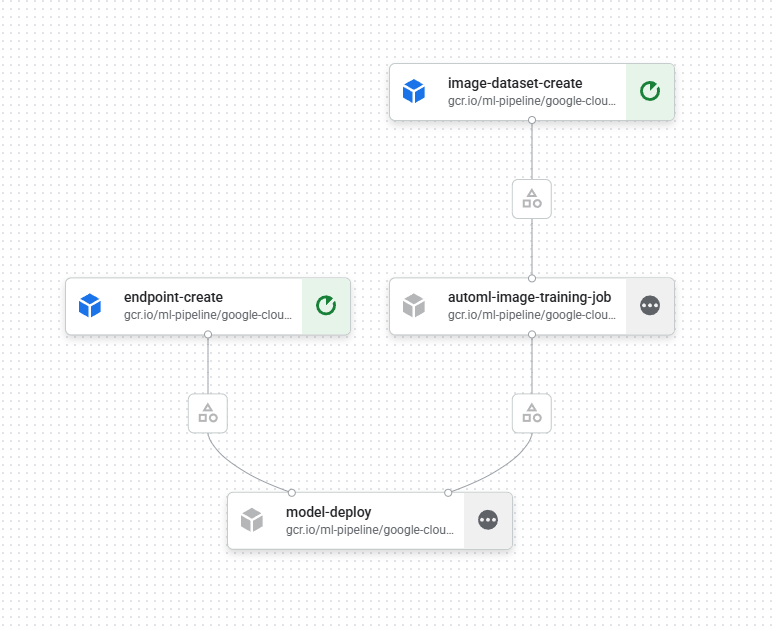
이미지 데이터셋 생성 → AutoML 학습 → Endpoint 생성 → 모델 배포까지
한 번에 수행하는 파이프라인 코드를 정리한다.
1
2
3
4
5
6
7
from dotenv import load_dotenv
import os

load_dotenv(dotenv_path="project.env")

PROJECT_ID = os.getenv("PROJECT_ID")
REGION = os.getenv("REGION")
1
2
# Project ID 세팅
! gcloud config set project {PROJECT_ID}
1
Updated property [core/project].
1
BUCKET_URI = f"gs://practice-{PROJECT_ID}"
1
! gsutil mb -l {REGION} -p {PROJECT_ID} {BUCKET_URI}
1
2
Creating gs://practice-atomic-marking-482405-a5/...
ServiceException: 409 A Cloud Storage bucket named 'practice-atomic-marking-482405-a5' already exists. Try another name. Bucket names must be globally unique across all Google Cloud projects, including those outside of your organization.
1
2
shell_output = !gcloud auth list 2>/dev/null
SERVICE_ACCOUNT = shell_output[2].replace("*", "").strip()
1
2
! gsutil iam ch serviceAccount:{SERVICE_ACCOUNT}:roles/storage.objectCreator $BUCKET_URI
! gsutil iam ch serviceAccount:{SERVICE_ACCOUNT}:roles/storage.objectViewer $BUCKET_URI
1
2
No changes made to gs://practice-atomic-marking-482405-a5/
No changes made to gs://practice-atomic-marking-482405-a5/
전체 파이프라인 개요
이 파이프라인은 다음 과정을 자동으로 수행한다.
- Image Dataset 생성
- AutoML Image Classification 학습
- Endpoint 생성
- 모델 배포 (Online Serving)
참고: GCP 파이프라인 구축
1
2
3
4
5
6
7
8
from typing import Any, Dict, List

import google.cloud.aiplatform as aip
import kfp
from kfp.v2 import compiler

import random
import string
1
PIPELINE_ROOT = f"{BUCKET_URI}/pipeline_root/automl_image_classification"
1
aip.init(project=PROJECT_ID, staging_bucket=BUCKET_URI)
1
2
3
4
5
6
7
8
9
10
11
12
13
14
15
16
17
18
19
20
21
22
23
24
25
26
27
28
29
30
31
32
33
34
35
36
37
38
39
40
41
42
43
44
45
46
47
48
49
50
51
52
53
54
55
56
57
58
@kfp.dsl.pipeline(name="automl-flower-clf")
def pipeline(project: str = PROJECT_ID, region: str = REGION):
    # AutoML Image 학습 Job 컴포넌트
    from google_cloud_pipeline_components.v1.automl.training_job import (
        AutoMLImageTrainingJobRunOp
    )

    # 이미지 데이터셋 생성 컴포넌트
    from google_cloud_pipeline_components.v1.dataset import (
        ImageDatasetCreateOp
    )

    # Endpoint 생성 및 모델 배포 컴포넌트
    from google_cloud_pipeline_components.v1.endpoint import (
        EndpointCreateOp,
        ModelDeployOp
    )

    # 1️⃣ 이미지 분류용 Dataset 생성
    ds_op = ImageDatasetCreateOp(
        project=project,
        location=region,
        display_name="flowers_dataset",
        # 이미지 경로와 라벨이 포함된 CSV
        gcs_source="gs://cloud-samples-data/vision/automl_classification/flowers/all_data_v2.csv",
        # 단일 라벨 이미지 분류 스키마
        import_schema_uri=aip.schema.dataset.ioformat.image.single_label_classification,
    )

    # 2️⃣ AutoML Image Classification 학습 실행
    training_job_run_op = AutoMLImageTrainingJobRunOp(
        project=project,
        location=region,
        display_name="automl-flower-clf",
        prediction_type="classification",  # 분류 문제
        model_type="CLOUD",                 # Cloud AutoML 모델
        dataset=ds_op.outputs["dataset"],   # 위에서 생성한 Dataset 사용
        model_display_name="automl-flower-clf",
        training_fraction_split=0.6,        # 학습 데이터 60%
        validation_fraction_split=0.2,     # 검증 데이터 20%
        test_fraction_split=0.2,           # 테스트 데이터 20%
        budget_milli_node_hours=9000,       # 학습 예산
    )

    # 3️⃣ 모델 서빙을 위한 Endpoint 생성
    endpoint_op = EndpointCreateOp(
        project=project,
        location=region,
        display_name="automl-flower-clf",
    )

    # 4️⃣ 학습된 모델을 Endpoint에 배포
    ModelDeployOp(
        model=training_job_run_op.outputs["model"],
        endpoint=endpoint_op.outputs["endpoint"],
        automatic_resources_min_replica_count=1,
        automatic_resources_max_replica_count=1,
    )
1
2
3
compiler.Compiler().compile(
    pipeline_func=pipeline, package_path="automl_image_classification_pipeline.yaml"
)
1
2
3
4
5
6
7
8
9
10
11
UUID = "".join(random.choices(string.ascii_lowercase + string.digits, k=8))
DISPLAY_NAME = "flowers_automl_" + UUID

job = aip.PipelineJob(
    display_name=DISPLAY_NAME,
    template_path="automl_image_classification_pipeline.yaml",
    pipeline_root=PIPELINE_ROOT,
    enable_caching=False,
)

job.run()
SDK를 활용해서 Pipeline 정보 확인 및 컨트롤
1
2
3
4
5
6
def get_task_detail(
    task_details: List[Dict[str, Any]], task_name: str
) -> List[Dict[str, Any]]:
    for task_detail in task_details:
        if task_detail.task_name == task_name:
            return task_detail
pipeline detail 확인
1
2
3
4
pipeline_task_details = (
    job.gca_resource.job_detail.task_details
)
pipeline_task_details
endpoint 확인
1
2
3
4
5
6
endpoint_task = get_task_detail(pipeline_task_details, "endpoint-create")
endpoint_resourceName = (
    endpoint_task.outputs["endpoint"].artifacts[0].metadata["resourceName"]
)
endpoint = aip.Endpoint(endpoint_resourceName)
endpoint
1
2
<google.cloud.aiplatform.models.Endpoint object at 0x7fd7fe876bc0>
resource name: projects/374561168874/locations/us-central1/endpoints/7030909567185715200
endpoint undeploy와 삭제
1
2
endpoint.undeploy_all()
endpoint.delete()
pipeline의 모델과 모델 제거하기
1
2
3
4
model_task = get_task_detail(pipeline_task_details, "model-upload")
model_resourceName = model_task.outputs["model"].artifacts[0].metadata["resourceName"]
model = aip.Model(model_resourceName)
model.delete()
Pipline 제거하기
1
job.delete()
이 기사는 저작권자의 CC BY 4.0 라이센스를 따릅니다.